Web Toolbar by Wibiya

DriverEasy Professional 4.3.0.41335 + Portable

Download 0


DriverEasy Professional 4.3.0.41335 + Portable | 8.7 Mb
Driver Easy is such a practical tool that helps you solve the driver problem easily. It can auto-detect and download the latest suitable hardware drivers for your computer by just several clicks. With the friendly user interface, Driver Easy is quite easy to use that you can completely download all latest device drivers within 3 clicks.


Driver Easy Features

Your One-Stop Driver Solution
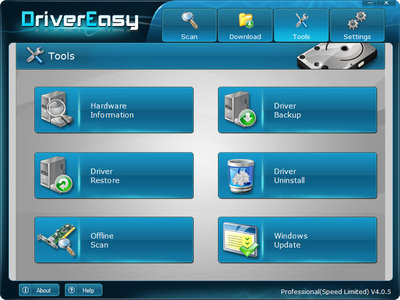
Driver Easy is design for quickly and easy to identify unknown device's drivers, and keep your driver in latest version. Much more, we have implement driver backup, driver restore, and driver uninstall feature, to ensure your driver secure and safe.

Smart "Auto-Installation"
This smart feature is our Industry first technology! It enable user to install the driver automatically ,even help you extract, analyze & install it. What you need to do is to click your mouse once or twice.

Detect Unknown Device Driver
Driver Easy has a huge online database, which include over 100,000,000 hardware device's driver, with it revolutionary driver detect engine, it help you download the unknown device driver, help you fix the driver issue.

Keep Existing Driver Up-to-Date
With our daily update driver database, your system will improve the performance, fix the blue screen problem, add more enhance feature by install the latest drivers.

Backup & Restore Drivers
Do not worry about it if you lost the driver disc, Driver Easy can backup the driver your current installed, you can restore it after system reload. This is an benefit feature if you not sure are the new driver compatible your system or not, you can backup existing driver, and roll-back it later.

Uninstall Removed Hardware Driver
When you replace the graphic card, do you know Windows still keep your old one driver, and will launch it each time, when Windows start up. This will case the system slowing boot up, and may case some system conflict. Driver Easy allow you uninstall the removed hardware, to clean up your system.

Home Page -
http://www.drivereasy.com/


 DriverEasy Professional 4.3.0.41335 + Portable


Auslogics Disk Defrag Professional 4.2.1.0 Portable

Download 0

Windows 7 Manager 4.1.7 full+ Portable

Download 0
                                   
                                                Author skymediafire on 8 November 2012 @ Software

Windows 7 Manager 4.1.7 + Portable | 13.1/10.5 MB
Windows 7 Manager is a system utility that helps you optimize, tweak, and clean up Windows 7. It will increase your system speed, improve system security, and meet all of your expectations.


Why Should I use Windows 7 Manager?

Windows 7 is the newest Operating System for home users and professionals alike. Windows 7 brings clarity to your world, so you can more safely and easily accomplish everyday tasks and instantly find what you want on your PC.

Windows 7 Manager is the powerful software tool to tweak and optimize your Windows 7, it bundles more than 30 different utilities in one and help your system faster and more stable, secure and personal!

Features and Benefits of Windows 7 Manager

Information

Get detailed system and all hardware information on your system; help you find out the installation key of Windows, Office products; show all detailed information of running processes and threads on your machine; Windows 7 Manager offers 1-clicking cleans your system automatically.

Optimizer
Tweak your system to improve windows startup and shutdown speed; tweak your hardware to increase system speed and performance; Optimize Task Schedule to turn off unnecessary system tasks.

Cleaner
Find out which files or folders engross your disk space and shown with chart; Find and clean junk files to increase Hard Disk space; Duplicate Files Finder can scan your computer for files with the same size, name and modification time; Registry Cleaner can easily checks your registry and repair incorrectly linked registry entries, automatically remove invalid entries; Registry Defrag rebuilds and re-indexs your registry to reduce application response time and registry access time.

Customization
Control what is started on Windows startup; tune up Windows 7 boot menu; edit context menus of mouse Right-Clicking; customize system desktop, menus, toolbar and notifications settings; automatically change your desktop wallpaper on background.

Security
You can improve desktop, menus, Windows logon securities, and enable numerous hidden performance options of system, disable system updates and error reports; hide and restrict to access drives, specify which applications are not allowed to be executed on your computer; encrypt/decrypt and shred files, change the location of system folders; Privacy Protector can maintain your personal privacy by eliminating the tracks that you leave behind; create lots of randomization password once.

Network
Optimize your Internet connection speed, manage all shares items; tweak your Internet Explorer easily.

Misc. Utilities
Show the collection of Windows utilities; split and merge any file.

Home Page -
http://www.yamicsoft.com/windows7manager/index.html

           Windows 7 Manager 4.1.7  full+ Portable


Ashampoo Snap 6.0.2 ML Portable full

Download 0


Ashampoo Snap 6.0.2 ML Portable | 18.2 MB

With the new Ashampoo Snap 6 you can capture just everything on your screen! Ashampoo Snap 6 enables you to create high-quality screenshots, videos and demos of your screen content. Edit, save and share your excellent results with others. This new version offers lots of innovative features and improvements, especially in the areas of video capture and editing tools.


The new video mode
Use the video mode to create videos and demos tailored to your needs. Capture film sequences or computer games in a window and save them as high-quality video files. You can also produce demos like video tutorials for software or presentations of websites. Videos and demos can be saved in different formats using various codecs. New fantastic features, like cursor and zoom effects, are available during video capture. Furthermore a recording can be paused and resumed anytime, in order to, for example, switch between applications or prepare the screen content. Of course, you are not limited to the main screen anymore, because Ashampoo Snap 4 also supports multi-monitor environments.

Even more editing tools for your screenshots
Create perfect-looking screenshots of your entire screen content or specially selected parts. After making a screenshot, an intuitive editor opens automatically and provides you with extensive editing tools, with which you can make your shots even more individual and original. Enhance your screenshots with, for example informative hints, arrows, texts, graphics, shapes, stamps and lots more, in order to convey facts or other topics in your shots easier and more illustrative.

Whether for work, for school or in your spare time - create screenshots and videos in no time and fill your colleagues, classmates or friends with enthusiasm for your amazing results.

Features:
- Video capture for movies
- Video capture for applications
- Choose video capture area, add your own voice
- Use Ashampoo Snap 3 as an editor to open and edit other images and videos
- Accurate scrolling capture printing
- Automatic filenames
- New editing tool for filling areas with color
- Capture freestyle shapes
- Unique mouse tools
- User assistance wizards
- Multilanguage interface

New features:
- All new video capture technique with new effects/options
- New cursor and zoom effects for video capture
- Support of more codecs/containers for video encoding
- Support of multi-monitor environments
- Pause the video recording
- Improved highlighting tool more than one area
- Objects, for example arrows, texts, shapes etc., are now editable
- High-quality objects anti-aliasing etc.
- Support of the Ashampoo Photo Commander format for import and export
- Stamps and graphics that can be added to screenshots
- Import/export of the whole application configurations in one INI file
- Send several screenshots as a single PDF file by e-mail


             Ashampoo Snap 6.0.2 ML Portable full


Bigasoft DVD to AVI Converter 3.1.7.4672 ML Portable

Download 0
                                 

Bigasoft DVD to AVI Converter 3.1.7.4672 ML Portable | 9.7 MB

Bigasoft DVD to AVI Converter, the professional and easy-to-use DVD AVI Converter, is especially designed for DVD fans to convert DVD to AVI, MPEG (MPEG-1, MPEG-2) or MPG with super high converting speed and quality. Besides, the powerful DVD to AVI software can also rip DVD music to MP3, WMA, and WAV audio formats. The DVD to AVI converter helps DVD fans best enjoy favorite DVD movies on most popular players including Xbox, Xbox 360, Archos, Creative Zen, iRiver, PSP, PS3, Wii.


Moreover, the powerful DVD AVI software is equipped with more powerful editing functions such as previewing the movie before ripping, customizing video quality, video size, clipping the movie, capturing the images in preview, automatically shutting down the computer after ripping finished, and so on.

          Bigasoft DVD to AVI Converter 3.1.7.4672 ML Portable


Aiseesoft Blu-ray Converter Ultimate 6.3.36 Full Eng Portable

Download 0


Aiseesoft Blu-ray Converter Ultimate 6.3.36 Portable | 39.3 Mb

Aiseesoft Blu Ray Converter Ultimate is the great all-in-one Blu Ray Converter software bundled of Blu-ray Ripper, HD Video Converter, iPod Transfer, MP3 to DVD Burner and DVD Copy, providing you the direct solution to convert Blu-ray disk and common DVD to video/audio in any formats. You can convert any video/HD video to any other formats for you to enjoy on any mobile devices. Create iPod/iPhone files/iPhone ringtone from DVD/video and transfer between computer and devices. Burn music DVD from all your audio files. Copy DVD to DVD disk, DVD Folder, ISO files and create DVD from them.


Amazing editing functions are associated with this powerful Blu Ray Converter Ultimate software. Clip video files and DVD chapters. Crop the aspect ratio and adjust the output effect. Merge multiple files and capture pictures from DVD/video files. Fast working speed and friendly user-interface can assist you to full enjoy the digital life.

Key Functions:
Convert Blu ray disk and common DVD
- With this Blu ray Converter tool, you can rip DVD and Blu ray disk to any other video/audio formats like MPEG, AVI, FLV, WMV, MP3, AAC and any others.
Convert HD video and any other video formats
- With the part of HD Video Converter, you can convert video and HD video like MTS, TS, M2TS files to any other formats.
Create and transfer iPod/iPhone files
- With iPod Transfer, you can transfer movie, music and picture between computer and iPod/iPhone devices. Moreover, you can create iPod/iPhone video/audio files and iPhone ringtone from your DVD/video sources, then directly import to devices.
Create music CD/DVD from any audio files
- Using MP3 to DVD Burner, you can burn CD or DVD from any audio files.
Copy and burn DVD
- Under the help of DVD Copy, you can copy DVD, copy DVD to DVD folder, ISO files and burn DVD from local DVD folder, ISO files.

Key Features:
- More editing functions to recreate output files
- While you convert video or rip DVD, in the video editing interface, you can adjust output video effect, capture video clips or DVD chapter, crop video aspect ratio, capture your favorite pictures.
- Create and transfer iPod/iPhone files with only one tool
- Using iPod Transfer, you can create iPod/iPhone files and iPhone ringtone from DVD and source video files. Then it can be directly imported to devices automatically.
- Copy DVD or burn DVD with high quality
- You can create music CD/DVD, copy DVD disk or DVD folder with high quality for you to enjoy.


  Aiseesoft Blu-ray Converter Ultimate 6.3.36 Full Eng Portable


Universal Maps Downloader 6.857 + Portable

Download 0

ADOBE PHOTOSHOP CS6 EXTENDED 13.0.1.1 MULTILANGUAGE PORTABLE X86

Download 0
                                                         
Adobe Photoshop CS6 Extended 13.0.1.1 Multilanguage Portable x86 | 92.60 MB


Adobe Photoshop CS6 Extended software delivers even more imaging magic, plus the Adobe Mercury Graphics Engine for blazingly fast performance. Retouch with greater precision, and intuitively create 3D graphics, 2D designs, and movies using new and reimagined tools and workflows.


English, Czech, Danish, German, Spanish, SpanishInternational, Finnish, French, Hungarian, Italian, Japanese, Korean, Norwegian, Dutch, Polish, PortugueseBR, Romanian, Russian, Swedish, Turkish, Ukrainian, SimpChinese, TradChinese)


Upgrade to Photoshop CS6 Extended and maximize your creativity. Unparalleled speed and power, groundbreaking Content-Aware tools, and simpler, more powerful 3D content creation are just a few of the enhancements in this powerful new release.


INSTALL NOTES
Language set by launcher according UserDefaultLang.
To change, edit PhotoshopCS6Portable.ini with Language="one of the extensions of tw10428 in App\PhotoshopCS6\Locales\en_US\Support Files" (Language="" for en_US). You can add plug-ins in App\PhotoshopCS6\Plug-ins


Extract and run Photoshop CS6 Portable. Settings created in Data. Don't run at the same time of another Adobe product or if you have Photoshop installed! Camera Raw 7.0.0.308 Plug-in 64 bit included.


All credits to Bernat / PortableAppz for the additional info.


                           ADOBE PHOTOSHOP CS6 EXTENDED


Easy CD-DA Extractor 16.1.0.1 Multilingual

Download 0

Easy CD-DA Extractor 16.1.0.1 Multilingual


Music Converter, CD Ripper, Audio Converter, CD/DVD Creator without installation.

Download Portable EasyCDDAExtractor (7.6 MB)


Extract and run EasyCDDAExtractorPortable.
Language set by launcher according SystemLang (if you don't want or for UniCode languages: write SystemLang=false in EasyCDDAExtractorPortable.ini).
Settings of installed EasyCDDAExtractor should be preserved.

Adobe Photoshop Lightroom 4.2 & 3.6 Multilingual 32 & 64 bit

Download 0

Adobe Photoshop Lightroom 4.2 & 3.6 Multilingual 32 & 64 bit


Professional photographer's essential toolbox without installation.
English, German, Spanish, French, Italian, Japanese, Korean, Dutch, Portuguese, Swedish, SimpChinese, TradChinese
                                                                           

Download Portable Lightroom 32 bit (33.4 MB)


Download Portable Lightroom 64 bit (36.4 MB)


Download fixed launcher if only 64 bit (0.08 MB)

If you want Camera & Lens Profiles (751 MB downloaded by installer):


Download Portable Lightroom 32-64 bit Online (0.4 MB)


3.6 is latest Lightroom running on Windows XP.

Download Portable Lightroom 3.6 32 bit (23.9 MB)


Download Portable Lightroom 3.6 64 bit (24.5 MB)


Download Portable Lightroom 3.6 32-64 bit Online (0.4 MB)

If you check Camera and Lens Profiles (3.6 Online), remove after install all useless (devices you don't have) subfolders in Data\AdobeAll\CameraRaw. Otherwise a lot of files will be moved between Data and APPDATA every time you start and close.


Extract and run LightroomPortable.
Select or create a catalog on startup.
Settings of installed Lightroom should be preserved.
Don't run at the same time of another Adobe product.

LibreOffice 3.6.2 Multilingual

Download 0

LibreOffice 3.6.2 Multilingual


Open Source personal productivity suite without installation.

Download Portable LibreOffice 3.6.2 Multilingual Online (0.3 MB)


English, Afrikaans, Arabic, Belarusian, Bulgarian, Bosnian, Catalan, Czech, Welsh, Danish, German, Greek, SpanishInternational, Estonian, Basque, Farsi, Finnish, French, Galician, Hebrew, Croatian, Hungarian, Indonesian, Icelandic, Italian, Japanese, Korean, Lithuanian, Latvian, Macedonian, Mongolian, Dutch, NorwegianNynorsk, Polish, Portuguese, PortugueseBR, Romanian, Russian, Slovak, Slovenian, Albanian, Serbian, Swedish, Thai, Turkish, Ukrainian, Uzbek, SimpChinese, TradChinese

Online installer will download LibO_3.6.2_Win_x86_install_multi.msi and extract files but you can also run the installer in the same location of the .msi and it will be used.
Extract and run LibreOffice*Portable.
Settings of installed LibreOffice should be preserved.

Can use Java Runtime Environment Portable

Java Runtime Environment 7 Update 9 32 & 64 bit

Download 0

Java Runtime Environment 7 Update 9 32 & 64 bit


Java Runtime Environment & Plug-in for Portable Apps.

Download Portable Java 32-64 bit Online (0.5 MB)


Extract in your PortableApps folder (CommonFiles and *Portable folders at the same level).
64 bit don't overwrite 32 bit files and use updated launchers for 64 bit browsers (Opera, Opera Next, Nightly, Palemoon and Waterfox)

Nero Burning ROM 12.0.20000 MultiLingual

Download 0

Nero Burning ROM 12.0.20000 MultiLingual


Burn CD and DVD without installation.

Download Portable Nero (26.6 MB)

(md5: 2f5cf4b9ae3ac94e08335cb45fe5d4b7)


Extract and run NeroPortable.
Language set by launcher according UserDefaultLang (if you don't want: write UserDefaultLang=false in NeroPortable.ini): Czech, Danish, German, Greek, English, SpanishInternational, Finnish, French, Hungarian, Italian, Japanese, Korean, Norwegian, Dutch, Polish, PortugueseBR, Portuguese, Russian, Swedish, Thai, Turkish, SimpChinese, TradChinese.
Settings of installed Nero should be preserved.

IDM UltraCompare Professional 8.40 Multilingual

Download 0

IDM UltraCompare Professional 8.40 Multilingual


Compare Text Files and Folders without installation.

Download Portable UltraCompare Multilingual Online (0.3 MB)

Téléchargez UltraCompare Portable 8.40.0.1000 Fr (7.0 MB)


Extract and run UltraComparePortable.
Multilingual Online (English, French, German, Italian, Japanese, Korean, SimpChinese, Spanish) download setup and extract files from it.

When new computer detected:
Click on Register, enter any License ID and Password in Activation Windows then click on Activate.
Click Offline Activation. Copy User Code 1 & 2 into CORE KeyGen (Program: UltraCompare v8.x). Then Generate.
Copy Authorization Code 1 & 2 into Offline Activation fields and any License ID and Password.
Then Activate, Exit Keygen and close the text.
Activations are kept for several computers.


Settings and shell integration of installed UltraCompare should be preserved.

xplorer² 2.2.0.1 32-64-bit Multilingual

Download 0

xplorer² 2.2.0.1 32-64-bit Multilingual


Windows File Manager without installation.

Download Portable Xplorer2 Online (0.6 MB)


Extract and run Xplorer2Portable.
English, PortugueseBR, Bulgarian, TradChinese, Czech, Dutch, French, German, Hungarian, Greek, Italian, Japanese, Polish, Serbian, Spanish, Swedish.
32 or 64 bit files selected by launcher.
Settings of installed Xplorer2 should be preserved.

Illustrator CS6 16.0.2 32 & 64 bit en_GB

Download 0

Illustrator CS6 16.0.2 32 & 64 bit en_GB


Graphic design software, vector drawing software without installation.

Download Portable Illustrator CS6 32 bit (122 MB)

(md5: 07e6272ae74ed22b60622696809aa25c)

Download Portable Illustrator CS6 64 bit (129 MB)

(md5: 3cd3e291e919c63a3f086d2d757ae2d9)


You can add plug-ins in App\IllustratorCS6\Plug-ins or App\IllustratorCS6_x64\Plug-ins

Extract and run IllustratorCS6Portable.
Don't run at the same time of another Adobe product or if you have Illustrator installed!

Snagit 11.1.0.248 En

Download 0

Snagit 11.1.0.248 En


Take a “snapshot” of anything on your PC screen without installation.

                            Download Portable Snagit Online (0.2 MB)


Extract and run SnagitPortable.
Don't forget to close if in systray when leaving.
Output set in Snagit (at the root of portable folder). If you want to fix paths yourself edit SnagitPortable.ini.
Settings of installed Snagit should be preserved.

Notepad++ 6.2 Multilingual

Download 0


Free source code editor without installation.

Download Portable Notepad++ Online (0.7 MB)

In first screen enter: 6.2

Extract and run Notepad++Portable.
Included Plugin: Explorer 1.8.2, Compare 1.5.6 & Light Explorer 2.0.
If you use as default editor (F4) in Total Commander edit Notepad++Portable.ini with AllowMultipleInstances=true.
Language set by launcher according Windows localization : Arabic, Bulgarian, Catalan, Croatian, Czech, Danish, Dutch, Farsi, Finnish, French, German, Greek, Hebrew, Hungarian, Indonesian, Italian, Japanese, Korean, Lithuanian, Norwegian, Polish, Portuguese, PortugueseBR, Romanian, Russian, SimpChinese, Slovak, Slovenian, Spanish, Swedish, TradChinese, Turkish, Ukrainian.
You can change Language in Settings-Preference...Localization Menu.
Portable settings in Data kept on update.
Settings of installed Notepad++ should be preserved.

DVDFab 8.2.1.5 Multilingual

Download 0

DVDFab 8.2.1.5 Multilingual


Copy Blu-ray/DVD and convert video file without installation.

Download Portable DVDFab Online (0.4 MB)


Options: "DVD to DVD", "DVD to Mobile", "Blu-ray to Blu-ray", "Blu-ray to Mobile", "File to Mobile" and "File Mover"
Extract and run DVDFabPortable.
Settings of installed DVDFab should be preserved.

Google Chrome 22.0.1229.94 Stable Multilingual

Download 0

Google Chrome 22.0.1229.94 Stable Multilingual


Google Internet browser without installation.

Download Portable Google Chrome MultiVersion Online (0.4 MB) (updated)


In first screen of Chrome MultiVersion Online, enter ver number:
24.0.1290.1 for Chrome Dev
23.0.1271.26 for Chrome Beta
22.0.1229.94 for Chrome Stable
Chrome Online will download setup and extract files.

                                                                                     
SRWare Iron is based on the Chromium-source and offers the same features as Chrome but without the critical points that the privacy concern.

Download Portable SRWare Iron 22.0.1250.0 Online (0.2 MB)


Iron Multiversion Online will download setup and extract files.

Flash Plugin (not needed for Chrome)


Extract and run ChromePortable or IronPortable.
If you want to add parameters, start in incognito mode, not set cache in temp, not delete cache or allow multiple instances: edit *Portable.ini.
Example: AdditionalParameters=--app=http://portableappz.blogspot.com
Settings of installed Chrome & Iron should be preserved.

Results in Acid3 Test :
Chrome & Iron: 100 %
 
SKY MEDIA © 2012 TechnoJourney. All rights reserved. The content is copyrighted to GN-Mediafire and may not be reproduced on other websites.. MEDIAFIRE DOWNLOAD CENTER
Proudly Powered by: Mediafire

MEDIAFIRE DOWNLOAD CENTER