Web Toolbar by Wibiya

FaceDominator PRO Full

Download 0


FaceDominator is a tool which is very useful for managing and automating your facebook advertising campaign. Learn more about FaceDominator Features with our Case Studies to help your business.


Facebook is largest social networking site with over 750 million active users. It's second most popular site in world with huge daily traffic from different countries. Due its unique viral features like facebook application, fanpages, groups, events, photo tagging, wall updates etc and with an automated tool, its easy to get viral targeted traffic.


FaceDominator is a tool which is very useful for managing and automating your facebook advertising campaign. It's an "All in One" tool which can create unlimited numbers of facebook accounts, adds friends in those accounts, create fanpages and make them viral, post on wall of grops/fanpages etc. In short, It helps you to manage and automate each and every activity of your facebook advertising campaign. Its an excellent tool for viral facebook marketing. The power and convenience of this tool is a MUST- HAVE for anyone needing fast and effective facebook traffic!

                                      Pas: SKYMEDIAFIRE

                     FaceDominator PRO Full


Who Is On My WiFi Ultimate v2.1.1 + Key Mediafire Link

Download 0

Xilisoft Video Converter Ultimate 7.6.0.20121127 full

Download 0


Xilisoft Video Converter Ultimate 7.6.0.20121127 | 36.3 MB
Xilisoft Video Converter is powerful, versatile video conversion software which converts between all popular video formats such as convert AVI to MPEG, WMV to AVI, WMV to MPEG or H.264/AVC video, convert AVI files to iPod formats, etc. No other programs like Xilisoft Video Converter supports so comprehensive video formats including AVI, MPEG, WMV, DivX, MP4, H.264/MPEG-4 AVC, RM, MOV, XviD, 3GP, FLV, VOB (the video format used in DVD), DAT (the video format used in VCD, SVCD), etc. In addition, the video converter provides an easy way to convert video file to popular audio file, like MP2, MP3, WMA, WAV, RA, M4A, AAC, AC3, OGG, etc. The video converter also supports APE, CUE decoding and audio CD ripping.


* Act as 3GP Video Converter, iPod Video Converter, PSP Video Converter, Zune Video Converter, AVI MPEG Converter, MP4 Video Converter, MOV Converter, MKV to MPEG converter, etc.;
* Convert between all popular video formats including AVI, MPEG, WMV, DivX, MP4, H.264/MPEG-4 AVC, RM, MOV, XviD, 3GP, FLV, help you on how to convert AVI to MPEG, convert MKV to AVI, convert MKV to MPEG;
* Convert videos to popular audio files, including MP2, MP3, WMA, WAV, RA, M4A, AAC, AC3, and OGG, and convert between these audio formats;
* Extract pictures from video and output them as JPG, PNG, GIF, BMP, SWF;
* Convert pictures to video formats like AVI, FLV, SWF, MOV, 3GP, WMV, etc.

Key Features:
* Powerful video effect editing functions to customize your video: crop video size, edit video effects, and add video watermark; (Ultimate only)
* Support the decoding and encoding of lossless audio; (Ultimate only)
* Preview and compare the source video and fixed video; (Ultimate only)
* Merge several video segments to one for conversion; (Ultimate and Platinum only)
* Clip segments from video and audio, and output them respectively or merge them into one for output; (Ultimate and Platinum only)
* Preview clipped video segment; (Ultimate and Platinum only)
* More optimized and classified profiles are supported now, and any profile can be customized to create your own one with your favorite settings;
* Customize the output file size and auto-calculate corresponding video bit rate;
* Multiple output formats can be set for one original to facilitate your conversion;
* Convert videos to compatible formats to work on PSP, PS3, iPod, iPhone, Apple TV, Zune, Archos, blackberry, iRiver PMP, Creative Zen, etc.;
* It supports H.264/AVC video format, PSP H.264/MPEG-4 AVC encoding/decoding, PSP H.264/AVC Video (480x272) (*.mp4);
* It provides batch conversion and multithreading, thus you can select multiple files at one time to have them convert one by one automatically;
* You can convert any clip or segment of the video at will by setting the start point and duration, and split one source file to several by duration or file size;
* video codec and audio codec can be modified: alternatively select video codec such as MPEG4, DVvideo, Mjpeg, etc. for AVI, H263, and MPEG4 for 3GP, as well as audio codec like PCM, MP2, MP3, MPEGAAC, AC3, etc.
* When converting files, you can pause, stop and continue at any moment;
* You can keep the default settings or set parameters of the video and audio by yourself to get particular effects for output file.

Home page -
http://www.xilisoft.com/


                  Xilisoft Video Converter Ultimate 7.6.0.20121127


Splash PRO 1.13.1 Multilanguage + Portable full

Download 0


Splash PRO 1.13.1 Multilanguage + Portable | 16.3/23.1 Mb
Play all your High Definition AVCHD™, MPEG-2, AVC/H.264 and VC-1 movies and camcorder clips, incredibly fast, smooth and without problems. You don't need any additional codecs. Download, install, watch. It takes about one second to start application and High Definition video playback!


Picture² - just stunning video quality!
Advanced picture post-processing engine, delivering stunning video quality. Watch standard and high definition videos like never before, enjoy smooth motion, crisp details and vivid colors.

The best player for your HD camcorder clips!
Supports AVCHD™ format. Rediscover High Definition quality with Splash PRO and state-of-the-art Picture² technology! Watch your 20/24/25/30p clips smooth like never before with Motion² technology. Browse your clips directly from the AVCHD™ camcorder with HD Camcorder interactive menus.

Ultra responsive, stylish and innovative User Interface.
Splash is compact, stylish, user friendly and incredibly fast! Discover Smart Seek, advanced seek mode designed to find specific movie scenes without interrupting video playback. Splash provides the best user experience for video files playback. Designed to enjoy multimedia the proper way.

EcoMode - Save energy!
Think green! Save energy, save your money and enjoy longer video playback on batteries. EcoMode's intelligent power management is designed to reduce power consumption of your mobile PC. Enjoy up to 40% longer video playback on laptop/netbook batteries. With EcoMode you can monitor your battery power consumption, wear level and more.

Featuring Mirillis Codecs.
Ultra fast audio and video decoders designed for your multi-core processor and graphics card hardware acceleration (GPU). Choose our optimized low power consumption technologies, save your mobile PC batteries, money and the environment. You don't need any additional codecs to play the best quality videos now!

Home Page -
http://mirillis.com/

    Splash PRO 1.13.1 Multilanguage + Portable


Ashampoo Snap 6.0.3 Multilanguage Portable

Download 0

WYSIWYG Web Builder v8.5.2 Full

Download 0

WYSIWYG Web Builder v8.5.2 Mediafire LinksNow available: Version 8.5.2
- HTML5 / CSS3 support
- Built-in CMS
- Carousel
- jQuery UI Theme Manager
- New navigation tools and much more!
- check out all 150 new features in 8.0
- check out 50 extra new features in 8.5!


Content Management System!
Online administrator panel to add/edit/copy and remove pages.
Built-in support for several popular editors like CKEditor, TinyMCE and CLEditor.
Uses individual 'design blocks' for optimal flexibility, so you can easily integrate it into your existing layouts.
Separate CMS Menu object to navigate between online pages. The menu has many customizable options.
Built-in search functionality to search online content.
Supports AJAX to allow the user to quickly navigate between pages without have to reload the whole page!
CMS integrates with the login tools so you can assign different users to the CMS but also have a global admin.
The CMS keeps track of the page views.
Also supports external pages, so you can mix online content with standard pages.


Create HTML5 / CSS3 websites today!
HTML5 document type (optimized HTML5 output).
HTML5 audio/video and YouTube HTML5 support.
HTML5 forms: native form validation, new input types and options, web storage.
HTML5 and support in shapes and other drawing tools.
CSS3 @font-face. Use non web safe fonts in all modern browsers.
CSS3 opacity, border radius, box shadow.
CSS3 gradients. Add cool gradient effects using native CSS3 (no images).
CSS3 navigation menu. Create awesome menus without using JavaScript or images.
CSS3 photo gallery.


Desktop publishing for the web, build web sites as easy as Drag & Drop!
"One Click Publishing" No FTP program needed. No special hosting required, use with any Hosting Service!
Easily create forms using the built-in Form Wizard plus Form validation tools and built-in CAPTCHA.
Advanced graphics tools like shapes, textArt, rotation, shadows and many other image effects.
Fully integrated jQuery UI (Accordion, Tabs etc), animations, effects and built-in ThemeRoller support.
Google compatible sitemap generator / PayPal eCommerce Tools / Login Tools/Page Password Protection.
Many navigation tools available: Navigation bars, tab menus, dropdown menus, sitetree, slidemenus.
Built-in Slide Shows, Photo Galleries, Rollover images, Banners etc.
Support for YouTube, Flash Video, Windows Media Player and many other video formats.
Unique extension (add-on) system with already more than 250 extensions available!


Generic features!
Visually web design (WYSIWYG, drag & drop).
No HTML knowledge needed!
Outputs standard HTML4, HTML5, XHTML, CSS3, PHP.
Template support (100+).
Style Manager (global styling, H1, H2, H3 etc)
Flash, HTML5 Audio/Video, YouTube, Flash Video and more!
Slidehows, photo galleries, rollover images, rollover text.
Navigation bars, Menu bar and many other navigation options.


Unique features!
Image tools (effects, rotate, slideshows, galleries etc).
Drawing tools (shapes, textart, curves, clipart etc)
Advanced form tools (php form processor, validation, mysql).
Built-in login system (protect pages with username/password).
jQuery UI integration (tabs, accordion, animation, effects).
Easy integration with Twitter, Facebook and other social media.
Built-in Content Management System.• Hundreds of amazing extensions!


                           WYSIWYG Web Builder v8.5.2 Full 


EmEditor Professional 12.0.7 Final (x86/x64) Full Mediafire link

Download 0
                                                 
EmEditor Professional 12.0.7 Final Mediafire LinksEmEditor Professional - professional version of the powerful text editor for programmers, Web developers and ordinary users with the illumination of syntax and Unicode support. Editor features such as search and replace in files using regular expressions, auto-detection coding, highlighting the links and email addresses, block selection mode, configure the button bar, menu, font and color elements. For each language, you can create a separate configuration. The program also has the support of powerful macros written in javascript or VBScript, allowing you to capture virtually any action, used often or occasionally.


This editor is an ideal tool for editing HTML, PHP, JSP and XML files. When you specify a web browser as an external application, you will be able to view HTML files during editing. Supports syntax highlighting ASP, C #, C, CSS, HTML, Java, javascript, JSP, Pascal (Delphi), Perl, Python, PHP, SQL, VBScript and other programming languages, function Drag & Drop, opening files size up to 248 GB the possibility of connecting additional external applications and plug-ins. In addition, the program allows to work with macros written in javascript or VBScript, and based on the Windows Scripting Host (WSH) engine, allows you to automate virtually any action. Adjustable backlight HTML and scripting languages makes it easy to detect spelling errors and typos.


Features:
• Support for file sizes up to 248 GB
• Edit binary files
• Optimized search and relocation
• Improved design plug-ins
• Ability to display panel functions
• Optimized speed when each row has a greater length
• Auto-panning by clicking the mouse wheel
• Supports Drag and drop
• Specify the temporary folder in the program settings
• Import INI files in the registry
• Unicode
• Syntax highlighting for ASP, C, CSS, HTML, javascript, JSP, Pascal, Perl, Python, PHP, SQL, VBScript and other
• User-friendly interface with customizable toolbar


EmEditor Professional Features List:
* Large File Support
* Unicode Support
* Macros
* Vertical Selection Editing
* Tabbed Windows, Drag and Drop
* Lightweight Design
* Regular Expressions
* Binary Editing
* Crash Recovery
* Grab Text


                EmEditor Professional 12.0.7 Final (x86/x64) Full Mediafire link


Serif PhotoPlus X6 16.0.1.29 Final full mediafire

Download 0


Serif PhotoPlus X6 16.0.1.29 Final Mediafire LinksProfessional features without the learning curve
Edit and enhance photos of family, friends, and holidays with the easy-to-use tools in our great-value photo editing software.


FEATURES
Edit and transform photos in a flash
The tiniest adjustments in PhotoPlus can turn a quick snap into a photo to truly treasure. And with the PhotoFix Studio, touching up and fine tuning is almost as easy as pressing the shutter on your camera.
Spots, blemishes, uneven horizons, brightness, contrast – correct all of these and many more common problems, as well as cropping and resizing to fit photo frames, and reveal your photos’ true beauty in just a couple of clicks.
Not happy with your editing? No problem. Return to your original image at any time with non-destructive adjustments – now including cropping.


Unleash your creativity
Removing someone or something from a photo isn’t a trick reserved for the pros anymore. Achieve it yourself with amazing speed and accuracy, thanks to PhotoPlus’ intuitive cut-out tools.
Take the precision of your cutting-out to a new level with the new Smart Selection and Edge Refinement tools, and add the finishing touches with the Clone tool. The disappearing act is seamless – perfect for removing unwanted items.
A host of other creative effects are just as easy to apply too. Revolutionise photos in a few clicks with selective colour, watercolour, oil, impressionist, or (brand new) tilt shift effects, as well as traditional film grain and lens flare enhancements.


Breathe life into old photos
Editing takes no time, but photos last a lifetime with PhotoPlus X6. Preserve cherished memories for yourself and future generations by importing, restoring, and reinvigorating your old or damaged photos.
Scratches, creases, marks, and other defects are unavoidable as time passes, but you can get rid of them completely with PhotoPlus X6’s Scratch Remover.
They’re easier than ever to repair and you can even remove pesky spots, freckles, and loose hairs too, with the Blemish Remover.


Be adventurous with high-end tools
You don’t need to be a pro to produce professional results in PhotoPlus X6. Explore the software’s easy-to-use, higher-end features like the Raw Studio.
If you shoot Raw files with a digital SLR camera, you’ll love how uncomplicated manipulating your photo is so that it looks perfect. Simply drag sliders to adjust lighting and colour, and crop and add effects as well, all within the studio.
Want to effortlessly catch the eye with vivid and vibrant photography? PhotoPlus X6 boasts flawless High Dynamic Range image merging too.


Work faster and more smoothly than ever
Editing photos can be time-consuming and tedious, but not with PhotoPlus X6 and its unrivalled ease of use and speed.
Work at a pace that suits you with step-by-step ‘How To’ guides and video tutorials, cleverly and conveniently integrated into a sleek user interface. PhotoPlus will even do some of the work for you – just tell it to ‘do this for me’.
Tired of making the same adjustment to hundreds of photos? Take care of them in one go with time-saving batch processing. And forget watching the egg timer while a task completes; X6 is faster than previous versions.


Organise photos and share in a click
When the editing is done, share your photos and show off your skills, either by instantly uploading to Facebook and Flickr or by creating your own photo albums.
The only hard part might be choosing which photos to share with your friends and family, but even that is made simple in this invaluable photo editor. Find the photos you want in a flash with PhotoPlus Organizer.
Rate your snaps and view them on a map of the world too. This will help you stay on top of your image collection, no matter how large it gets.


New Features


Make selections with great precision
If you like cutting people or objects from photos, but hate tackling tricky areas like hair or leaves, you’ll love our new Smart Selection and Edge Refinement tools.
A clever selection brush makes selecting parts of an image or cutting out intricate parts of a photo much more refined. And new smart edge refinement improves selections even further; hone in on detailed areas for flawless cut-outs.


Work faster than ever
PhotoPlus X6 operates faster than ever before if you’re working on a computer or laptop with a 64-bit operating system.
A brand new engine means no more waiting for the program to catch you up, which is especially helpful when editing complex or large images and Raw files.


Uncrop and keep all adjustments
Ever cropped a photo, edited and adjusted it, then decided you didn’t like your crop? Reverting to your original image would’ve meant losing all those changes you made, but not anymore.
Non-destructive cropping makes your original image retrievable whenever you need it, without discarding any further edits you’ve carried out. Genius!


Edit Raw files in more detail
Working with Raw files in SLR-optimised PhotoPlus X6, you’ll want complete flexibility when it comes to shaping your photos. And that’s exactly what you get with our re-engineered Raw Studio.
Drag and drop lighting effects, adjust white balance and exposure, reduce noise, crop, and apply adjustments in specific areas with masks. All-round enhancements make Raw editing more convenient and powerful than ever.


Improve photos with noise reduction
Take care of coloured specks, blotches, and grains with seamless noise reduction. Correct luminance noise or colour noise, directly on a photo.


Zoom in further for better accuracy
Editing photos has never been as accurate as in PhotoPlus X6. Zoom in twice as far as before – ideal when working with large images.


Position guides more precisely
Place sub-pixel guides with incredible meticulousness – perfect for placing items or text in your photo exactly where you want them.


Create stylish tilt shift shots
The Depth of Field effect produces a model-like feel in a photo. Just set blur, brightness, and saturation for your very own miniature scene.


Mask layers with editable curves
Vector masks in brand new PhotoPlus X6 can be created with fully editable curves that mask layers or adjustments.


Edit fill layers at any time
Fill a layer with a colour or gradient and start editing, safe in the knowledge that you can go back and edit the layer’s fill whenever you like.


Minimum requirements
- Windows-based PC with DVD/CD drive and mouse (main processor must support SSE2 instructions)
- Microsoft Windows® 8, 7, Vista, or XP Service Pack 2 (32 bit) operating system
- 512MB RAM
- 821MB free hard disk space
- 1024 x 768 monitor resolution

                Serif PhotoPlus X6 16.0.1.29 Final full mediafire


Animated Screensaver Maker v3.1.5 + Crack

Download 0

Animated Screensaver Maker v3.1.5 Mediafire LinksAs opposed to old-fashioned slideshow screensaver builders, with Animated Screensaver Maker you can turn static photos into real animated scenes. You can easily create a virtual aquarium with moving fish, make a seaside scene, add weather effects, or use any of several other animated effects and objects!


DesktopPaints Animated Screensaver Maker is a powerful desktop solution that gives you a rich toolset for animation design and screensaver building. Flexible and easy-to-use tools now let you create animated screensavers in an entirely new way. As opposed to old-fashioned slideshow screensaver builders, with Animated Screensaver Maker you are able to turn your photos into live animated scenes with fire, water, or optical effects and then enliven them with flaring lightings, pouring rain, falling leaves and may other options. You can also import your own animated gif files. Then you can save the result as a screensaver in one click and easily share it with your friends and family.
How It Works


With Animated Screensaver Maker you don't need art or drawing skills to create a stunning screensaver. Just load your photo, choose a transformation effect, add animated objects, and click a button to build a screensaver. Optionally you can adjust the properties of each screensaver animation. You can control the motion, appearance, and other features with a few mouse clicks.
Key Features of Animated Screensaver Maker


Many animated objects such as swimming fish, swaying plants, rain, falling snow, and so on.
Creating your own screensaver in less than a minute.
An old-fashioned slideshow screensaver mode.
Options to save a screensaver in .SCR format or install it on your computer instantly.
Support for animated gif and all other image formats (jpeg, bmp, tga, etc.).
Many samples and useful articles (see Gallery and FAQ sections).


                      Animated Screensaver Maker v3.1.5 + Crack


IconCool Manager v6.20 build 121120

Download 0


IconCool Manager v6.20 build 121120 Mediafire LinksIconCool Manager
IconCool Manager is an ideal tool to manage, keep, modify, extract, convert, enlarge and contract icons. An icon library with dozens of sample entries is included and accessible through a tree-style organizational system, allowing you to categorize icons and create new classes and sublibraries within them. IconCool Manager includes 1300 sample icons which are free for registered users.

A Powerful Icon Tool
IconCool Manager contains hundreds Windows XP system icons for software development usage. IconCool Manager lets you easily search, extract, convert, create, manage, store, archive, enlarge, reduce and distribute icons. IconCool Manager can easily export icons to CUR, GIF, JPG, PNG, WBMP, EMF, TGA, WMF, TIF and ICL file formats.


A Vista Icon Manager
IconCool Manager has begun to support the next generation OS Window Vista from now on. You can manage Vista icons which include the compressed 256x256 images easily. Now IconCool Manager has been a powerful tool for batch conversions of Vista icons.


An Icon Library Manager
Use IconCool Manager to sort icons into multiple sub-libraries, such as computer, office, people, animal, art, and so on, as required, to simplify subsequent retrieval. IconCool Manager can create single icon libraries ("One by One") or sub-libraries ("One in One"), the options are limited only by the available space on your system. IconCool Manager can export a total icon library to a single ICL file. You can search within your icon library using keywords. IconCool makes adding or editing the keywords a simple task.


A Full-Featured Icon Extracter
View and extract all types of icon from within any file, then save them as icons or image files of various sizes. Add them easily to your IconCool libraries.


An Icon Converter and Creator
You can create icons by simply converting other graphic files. IconCool Manager can open images in the following formats: BMP; DIB; EMF; GIF; ICB; ICO; JPG; JPEG; PBM; PCD; PCX; PGM; PNG; PPM; PSD; PSP; RLE; SGI; TGA; TIF; TIFF; VDA; VST; WBMP and WMF. IconCool Manager can save images in the following formats: ICO; CUR; ICL; BMP; GIF; JPG; PNG and WBMP. IconCool Manager includes a smart capturing tool. You can capture images easily from your desktop or other software.


A Directory of Icon Web Sites
A third tab includes a large directory of 800 icon web sites, and lets you edit, delete, and add new sites.


Supported OS:
Microsoft Windows 7, 8, Vista and XP


                           IconCool Manager v6.20 build 121120


StudioLine Web 3.70.51.0 Portable full

Download 0


StudioLine Web 3.70.51.0 Portable | 187.1 Mb
StudioLine Web integrates all functions for designing, publishing and maintaining professional web sites into a single user interface – layout editor, page editor, image archive, image editing, graphics and text effects, picture galleries, file transfer and site management. An absolute novelty – you easily edit your images, apply special effects and arrange them as collages directly on your page and immediately view the outcome. With StudioLine Web you realize your web designs in a snap: Images and text are positioned freely and remain editable. In three steps, your page is published to the Internet.


For a successful start, we're offering a tutorial that walks you through the steps of creating this sample web site. You'll learn the basics and pick up many hints and tips for your own web site projects. Quality is not a luxury. Get started now, you'll master StudioLine in record time. Find pictures in the image archive using your descriptions and any combination of system, camera and user tags. Automatically generated web galleries and slide shows.

Some key features:
» Page Editor - The heart of StudioLine Web
» Layout Editor - The powerful tool to give web sites a constant look and feel
» Image Galleries - Build the sophisticated galleries you dreamed of
» Special Graphic Effects
» Site Management - everthing to control even large web sites
» Publishing Management - FTP uploading the intelligent way.
» Support for RAW Files


Home Page - http://www.studioline.biz/


                      StudioLine Web 3.70.51.0 Portable full


Ashampoo.WinOptimizer.9.v9rar With Key

Download 0


Ashampoo WinOptimizer 7.23 | 24 mb

The completely new interface of Ashampoo WinOptimizer 7 combines newly developed modules with optimized tried-and-tested modules to create a perfect synthesis of system tuning, maintenance, and reliable protection. The latest generation of Ashampoo WinOptimizer has a fresh look and feel that is inspired by the user interface of Windows® 7. The all-in-one interface allows fast access to the integrated function groups. The innovative online rating system pools the knowledge of all Ashampoo WinOptimizer users and enables direct online updating and synchronization. You benefit twofold: from our wealth of experience and the experiences of the community. There's no need to get frustrated with your PC or give up on your system. Just sit back and relax. Ashampoo WinOptimizer 7 is the maintenance specialist for your computer. Ashampoo WinOptimizer 7 stands for state-of-the-art technology, efficiency, security, and intuitive user guidance. Or simply put: For making work fun.


New functions of Ashampoo® WinOptimizer 7:
* New all-in-one interface for intuitive operation and efficient workflow
* Automatic system analysis on start of the program
* Disc Doktor for hard drive maintenance
* Service Manager including online connection
* StartUp Tuner including online connection
* File Associator for automatic checking and repair of faulty file associations
* Improved scan algorithms for better cleaning results and greater security

Ashampoo WinOptimizer 7 has fulfilled a number of development goals with great success. The new program interface and user guidance make it easy for even new users of Ashampoo WinOptimizer 7 to find their way around the application. But what good is a fabulous look and feel if the performance is not up to par? The secret behind the enhanced cleaning efficiency are scan algorithms which have been optimized to their fullest. Moreover, updated exception lists offer even more security. Automatic check routines and corrections including defragmentation guarantee the ultimate in convenience. The most popular function in Ashampoo WinOptimizer-the One-Click Optimizer-pretty much sums it up: You clean up and optimize your Windows® system with just ONE click.

Still not convinced? Compared to previous versions, you now have access to a greater amount of more detailed information, with explanations and recommendations on found objects, Windows® services, tweaks, settings, etc. And, not least, we've integrated an online rating system into two of the Ashampoo WinOptimizer 7 modules for your additional convenience. These allow interactive queries to be sent to the Ashampoo WinOptimizer 7 user community as well as online updating and the synchronization of ratings.

Here's What's New in the Ashampoo WinOptimizer Toolbox:
* All-In-One User Interface
* Disk Doctor
* System Analysis
* Service Manager
* StartUp Tuner
* File Associator

Further Improvements at a Glance:
* One-Click Optimizer
* Drive Cleaner
* Registry Optimizer
* Internet Cleaner
* Tweaking
* System Information
* Defrag 3


Homepage - http://www.ashampoo.com


   Ashampoo.WinOptimizer.9.v9rar  With Key


VMWare ThinApp Enterprise 4.7.3 Build 891762 Full version

Download 0

                                 
VMWare ThinApp Enterprise 4.7.3 Build 891762
VMWare ThinApp - a package that is a competitor of Microsoft and Citrix, designed for virtualization applications. Simply put, with the help of this tool you can from the usual applications to easily make a portable (portable) version. The approach allows the «package» application in a container that contains all the information you need to work on any computer without the need to install the desired application.


Thus, importantly, virtualized software in no way affects and does not alter the current state of the operating system. The very same idea is to prevent software conflicts that can disrupt the system and installed it on. The usefulness is obvious: developers, for example, may carry out tests of new products without risk to violate the stability of the system environment. The approach will reduce the cost of deploying applications on the computers of end users. ThinApp allows you to run multiple versions of the same program. Thus, the simultaneous use of Internet Explorer 6 and 7 should be useful in the process of testing sites.

Resulting in an application virtualization becoming available to end users on a network or using flash cards. This program is very good distributes applications, so no longer need to conduct extensive regression tests to check conflicts with other applications (or previous versions of this product). Along with competing products (for example, the beta Microsoft Application Virtualization 4.5 and Altiris Software Virtualization Solution) Program VMware ThinApp significantly different from the traditional tools for packaging applications because it can download an application package in a special section created in the system end user, so that the application will be done without crossing with other software that may already be installed.

Previously, there was a significant flaw: virtualized applications have been denied the opportunity to share data among themselves, since each of them performed in a single «sandbox». If the user while working with virtualized Microsoft Word tries to open Internet-link, a text editor can not turn to the browser. In ThinApp 4 has a new function is Application Link, which in the process of preparing the container, you can create the necessary links between virtualized applications. In the future, perhaps association of ThinApp with Virtual Desktop Infrastructure, the proposed use is located on a remote server system and application environment. Analysts suggest that by 2010 virtualization applications will be due the introduction of a large business - an approach will be adopted by 50% of the companies.

Detection of conflicts when you install applications via virtualization
Application Virtualization applications distanced itself from the operating system and from each other, thus reducing the cost of testing, and minimizing conflicts incorrect applications. Just vstroyte file. MSI or. EXE for the introduction of a virtual environment system, including registry keys, DLL, and the structure of third-party libraries without requiring the installation of agents or applications to the appropriate operating system.

The only archiving and implementation at any point (Network, USB, physical and virtual desktops)
Implement virtualized applications in user mode, without administrative rights. No need to install device drivers and edit the registry, because the program and its virtual OS are considered as a single EXE. Behind distribute large applications from a network drive shared without the client or server software. Keep or return back applications even while they work. The new version will be launched at next use.

Using Mobile Devices
Users will be able to run applications on virtually any computer to which they have access, including personal computers in the kiosks and hotels. You do not need to install software or drivers, and do not need administrator rights. Applications run directly from removable storage devices including flash drives.

Improving the process of distribution
Protecting the local operating system to changes that may lead to unstable or create security holes, using the existing tools settings. Even users with restricted records can safely run virtual applications without the need for local installation, which makes the product more attractive to the IT-staff, concerns about security.

Easy migration of operating systems and applications
Virtualization of applications without the agent ThinApp makes it easier to migrate operating systems, allowing applications to run together on the same operating system. Users can continue to operate as usual without interruption of the problematic applications. Moreover, if an application need to be removed from the final node - it will look like a simple file deletion without the need for «clean» registry.

VMWare ThinApp Enterprise 4.7.3 Build 891762

               VMWare ThinApp Enterprise 4.7.3 Build 891762


Xara 3D Maker 7.0.0.415 FULL | 21MB {Mediafire link}

Download 0


Professional 3D graphic maker, Xara 3D Maker allows you to create your own 3D graphic you can use for customizing website appearance, make your web more interesting and personalized.
Xara 3D maker, or previously known as Xara 3D, is a powerfulapplication designed to make animated gifs, buttons, banner graphics and titles for presentations and web pages.
You can easy use this application to create 3D image, or converting 2D shapes into 3D with simple change the extrude depth, lighting, bevel, color and texture, shadow, font size and type.

Traditional 3D programs are notoriously difficult to use and understand. Not so Xara 3D Maker. Unlike many 3D programs that take an age to learn and understand, Xara 3D Maker has been created to perform one job, and performs that job with style, speed and simplicity


            Xara 3D Maker 7.0.0.415 FULL | 21MB {Mediafire link}


MAGIX Movie Edit Pro 2013 Premium 12.0.0.32 - Rapidshare

Download 0

Ashampoo Burning Studio 2012 12.0.1.8 (3510) Multilingual Full Version

Download 0

Photo Montage Guide 1.5.1 Full

Download 0

PDF-XChange 2012 Pro 5.0.266.0 Multilingual Full

Download 0
PDF-XChange 2012 Pro 5.0.266.0 Multilingual


PDF-XChange 2012 Pro 5.0.266.0 Multilingual | 33.2 MB
Tracker Software PDF-XChange Pro - all you need to create PDF-files from almost any program for Windows, which can print documents. Formatting and view PDF-documents will exactly match the original. You can also add notes, watermarks, use the flexibility to configure and optimize to get the smallest file, compared with similar programs, the file size without compromising quality. The program provides a utility for batch conversion of documents of Word, Excel and file formats that are supported by IE, as well as many others (DOC, RTF, TXT, XLS, HTML).


Feature:
# World leading compression and optimization technology
# Includes PDF-XChange Viewer PRO and PDF-Tools PDF wizard application
# Create new PDF files from the output of any Windows application
# Complete Control over PDF creation properties
# Batched & "Watched" Folder Conversion to PDF of MS Office documents
# ISO PDF/A 1b format support for guaranteed long term archive standards support
# Create Interactive Adobe AcroForms (using converted MS Word Web forms via Toolbar Add-in)
# Document Security - Password Protection &Permission options
# Optimization/Compression Controls
# Advanced Memory Management
# Convert Image files to PDF (Raster/Metafile Imgae Formats)
# Convert PDF to Image Formats (Raster Formats only - BMP, JPEG, TIFF, etc.)
# Append/Prepend Pages from one PDF file into another PDF file
# Comprehensive Job Management Features
# Extended functionality provided for MS Office integration - via the Toolbar Add-in
# Scan Direct to PDF
# Convert Images and Text to PDF without the use of third-party applications
# Manipulate and Modify Exisiting PDF files
# Extract Content from PDF to Text/Image/PDF formats
# Add/Edit/Modify Bookmarks
# Convert PDF to .DOC & .RTF (no OCR capabilities)
# Extract PDF pages to a new PDF file
# Split/Merge PDF files
# Delete/Crop/Rotate PDF pages
# Re-Order Pages within a PDF file
# Paper Settings & Custom Forms options
# Control Resolution/Scaling
# Mirrored Printing support
# Include 'clickable" URL links - literal (eg. http://www.tracker-software.com & mailto:sales@tracker-software.com)
# Include 'clickable' URL links - embedded (eg. Click Here & Send Email)
# Convert MS Office Table of Contents(TOC) 'Clickable' links to PDF
# n-UP Printing mode - automatically mounts and rescales pages to a single page and calculates correct page positions etc.
# Enhanced visual layout previewer allow you to resize pages via the printer preferences
# Brochure/Booklet Mode print output
# Flexible DPI output options 50 - 2400DPI available
# CJK fonts/character set support
# Add Watermarks or Overlay PDF pages to new PDF output - ideal for Company Stationery use.
# Auto Bookmark generation
# Auto Header/Footer generation
# Graphics Downsampling options(Linear, Bilinear, Bicubic) also Colour ->Grayscale->Mono options
# Extended Font embedding options
# Profiles - create specific printer preferences and save to Profiles for future use.
# MAPI/SMTP Automated Email integration options
# Developers API available(subject to licensing)
# Multi-language UI support

Home Page - http://www.tracker-software.com/


PDF-XChange 2012 Pro 5.0.266.0 Multilingual


AudioTool Media Audio Record Edit Toolbox Pro 12.8.1 With Key

Download 0
                               

AudioTool Media Audio Record Edit Toolbox Pro 12.8.1 | 22.7 MB
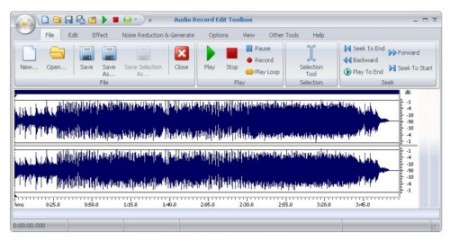
Audio Record Edit Toolbox helps you transfer tapes, LPs, live performances, Internet radio, TV, DVD, or any other sound source to your hard drive. The software helps protect your valuable recordings--just set the sound source, the recording quality, and volume, then start recording. The Editor allows you to perform various operations with audio data such as displaying a waveform image of an audio file, filtering, applying various audio effects and more. It includes a click and crackle filter for cleaning vinyl records, a noise filter for cassette-tape recordings, and an equalizer to enhance the sound quality of all recordings.


Key Features

Recording
Record new audio file from a microphone or another sound source.

Editing
Open, create and save audio files. Play an audio file or any part of it. Visually edit an audio file (Cut, Copy, Delete, Paste, PasteFrom File, Mix, Mix From File and Insert or Delete noise or silence in an audio file).

Top 5 Reasons to choose Audio Record Edit Toolbox
- Powerful Functions
- Best Quality
- Great Feedback
- 100% Clean
- Instant Delivery

Display
Display a waveform window of an audio file and apply zooming.

Digital effects
Apply different effects (Amplify, Delay, Equalizer, Fade, Flanger, Invert, Normalize, Reverse, Multi Tap Delay, Silence, Stretch, Vibrato, Echo, Chorus)

Audio filters
Apply different filters to the selected part of an audio file (Ban Pass Filter, High Pass Filter, High Shelf Filter, Low Pass Filter, Low Shelf Filter, Notch Filter)

Support all major audio formats
Audio Record Edit Toolbox supports a wide range of audio formats, such as MPEG (MP3, MP2), WAV, Windows Media Audio, Ogg Vorbis, Audio Tracks and Dialogic VOX. It is easy to convert an audio file from one format to another

Ease of use
Audio Record Edit Toolbox provides a customizable interface, allowing you to build projects the way you want. It also supports standard Windows keyboard commands and mouse shortcuts

Markers
Use markers in your audio file to quickly select between different selections!

Selection tool
Select a part of your audio file precisely with the selection tools of Audio Record Edit Toolbox

Home Page -
http://www.audio-tool.net


           AudioTool Media Audio Record Edit Toolbox Pro 12.8.1


Open Blu-ray Ripper 2.00 Build 501 With Key

Download 0


Open Blu-ray Ripper 2.00 Build 501 | 12.3 MB
Open Blu-ray ripper 2 is an all-in-one Blu-ray ripping tool with powerful functions. It can rip Blu-ray movies to popular audio and video formats for you freely watching on various devices, such as iPod, iPhone, iPhone 3GS, iPhone 4, iPhone 4S, iPhone 5, iPad 1, iPad 2, The new iPad, Apple TV, PSP, PS3, Xbox 360, Zune, Mobile Phone, GPhone, Smart Phone, PMP, Pocket PC, PDA, etc. The brand-new Express and Expert interfaces are designed to meet new and professional users' different needs.


Open Blu-ray ripper 2 has the new function of converting 2D to 3D movies and setting 3D features. Meanwhile, this new Blu-ray ripper enables you to trim and crop your Blu-ray movie as well as adjust the brightness, contrast, saturation, vertical flip, horizontal flip and the movie effect. You can also add text and image watermarks into your Blu-ray movies. The GPU acceleration makes the Blu-ray conversion much faster than before.

HST™ - Speed it up
With the advanced HST™ tech, the conversion speed of Open Blu-ray ripper 2 is largely improved. This speedup is realized through optimizing the GPU of the video card. Compared with other Blu-ray rippers, Open Blu-ray ripper 2 largely increases the encoding speed of H.264, much faster than ever. (An NVIDIA video card is needed.)

2D to 3D conversion
Open Blu-ray ripper 2 has been added the function of converting 2D movies to 3D format. It enables you to choose different 3D features such as Red/Cyan, Red/Green, Red/Blue, Blue/Yellow, Interleaved, etc and adjust the 3D depth to get your desired video effect.

Supports multiple formats
Open Blu-ray ripper 2 can freely rip Blu-ray movies to various video formats, such as AVI, MKV, WMV, MPG, 3GP, MP4, FLV, SWF, MOV, TS, RM, ASF, VOB, M4V and audio formats, such as MP3, M4A, WAV, AC3, MP2, AMR, FLAC, WMA, OGG, RA, AAC, AU, AIFF, DTS, etc.

Magical ripping functions
Open Blu-ray ripper 2 can convert 2D movies to 3D format. It enables you to choose different 3D features and adjust the 3D depth. As well, you can trim, crop your Blu-ray movies and add image or text watermarks into your converted movie. Batch conversion is also supported.

Easy to use
Open Blu-ray ripper 2 is equipped with brand-new Express and Expert interfaces. If you are a beginner, you can convert Blu-ray movies with only one click with the Express interface. If you are a professional user, you can customize your target file at ease with the Expert interface.

Home Page -
http://www.open-bluray-ripper.com/


Open Blu-ray Ripper 2.00 Build 501 With Key


SKY MEDIA © 2012 TechnoJourney. All rights reserved. The content is copyrighted to GN-Mediafire and may not be reproduced on other websites.. MEDIAFIRE DOWNLOAD CENTER
Proudly Powered by: Mediafire

MEDIAFIRE DOWNLOAD CENTER