Web Toolbar by Wibiya

DriverEasy Professional 4.3.0.41335 + Portable

Download 0


DriverEasy Professional 4.3.0.41335 + Portable | 8.7 Mb
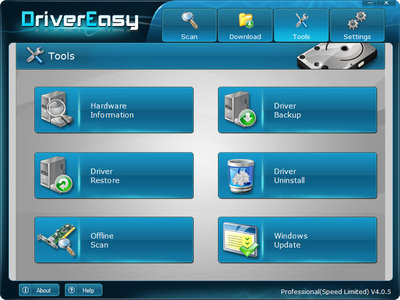
Driver Easy is such a practical tool that helps you solve the driver problem easily. It can auto-detect and download the latest suitable hardware drivers for your computer by just several clicks. With the friendly user interface, Driver Easy is quite easy to use that you can completely download all latest device drivers within 3 clicks.


Driver Easy Features

Your One-Stop Driver Solution
Driver Easy is design for quickly and easy to identify unknown device's drivers, and keep your driver in latest version. Much more, we have implement driver backup, driver restore, and driver uninstall feature, to ensure your driver secure and safe.

Smart "Auto-Installation"
This smart feature is our Industry first technology! It enable user to install the driver automatically ,even help you extract, analyze & install it. What you need to do is to click your mouse once or twice.

Detect Unknown Device Driver
Driver Easy has a huge online database, which include over 100,000,000 hardware device's driver, with it revolutionary driver detect engine, it help you download the unknown device driver, help you fix the driver issue.

Keep Existing Driver Up-to-Date
With our daily update driver database, your system will improve the performance, fix the blue screen problem, add more enhance feature by install the latest drivers.

Backup & Restore Drivers
Do not worry about it if you lost the driver disc, Driver Easy can backup the driver your current installed, you can restore it after system reload. This is an benefit feature if you not sure are the new driver compatible your system or not, you can backup existing driver, and roll-back it later.

Uninstall Removed Hardware Driver
When you replace the graphic card, do you know Windows still keep your old one driver, and will launch it each time, when Windows start up. This will case the system slowing boot up, and may case some system conflict. Driver Easy allow you uninstall the removed hardware, to clean up your system.

Home Page -
http://www.drivereasy.com/


 DriverEasy Professional 4.3.0.41335 + Portable


Pointstone System Cleaner v7.0.0.180 Mediafire Links

Download 0


Pointstone System Cleaner v7.0.0.180 Mediafire LinksSystem Cleaner™ is a tool for restoring hard-drive space, cleaning up the history of your activities on your computer and keeping your system running like new. The program allows you to clean your drives from unnecessary and temporary files, including your browser cache, cookies, history, recent document list, temporary files, errant uninstall entries and more. It targets more than 100 file extensions, which enable it to scan and recognize most of the unnecessary files on your computer. You can choose to delete the files to the recycle bin or to a specified backup folder. In addition, System Cleaner includes a Windows Startup manager and also allows you to remove invalid uninstaller information from the registry as well as a restore wizard to undo the changes if needed.


Key Features:
• Restores your hard drive's performance, hard-drive space and protect your privacy by cleaning Internet history, cache, temporary files, Windows temp files, recent document list, find history, run history, *.CHK files, the recycle bin, additional garbage and much, much more.
• Scans dead shortcuts from your Start menu and Desktop. If it finds any shortcuts that point to files that do not exist, it will list them for you.
• Lets you delete or disable entries that automatically start on Windows startup. This pulls all entries from your Start Menu-Programs-Startup folder as well as from the registry.
• Define your own user defined items to remove (specified files or folders).
• Backup files to a ZIP file or proprietary file format. You can later restore individual files using the "Restore Wizard".
• Clean Directories and Internet Cache Files. Allows you to clean directories that usually have Temporary Files or cache files (Windows Temp Directory, Documents Folder, MS Internet Explorer Cache Directory and Netscape Cache Directory).
• Powerful file search. You can select to scan for files between a certain date, with some or all file attributes, with a certain size or with the contents of a file matching a user-defined text string.
• Remove files to Recycle Bin, zip them, move them to a folder or completely delete them!
• Scans multiple hard drives.
• Fixes system errors that slow your PC down and cause it to crash
• Speeds up your PC's execution of software programs
• Removes space-wasting temporary files and other unnecessary disk clutter
• Tunes up and optimizes the Windows Registry
• Erases all evidence of your computer and internet activity
• Makes your PC boot faster
• Makes your PC shutdown faster
• Fine-tunes all important Windows settings


           Pointstone System Cleaner v7.0.0.180 Mediafire Links


Auslogics Disk Defrag Professional 4.2.1.0 Portable

Download 0

Genuine Registry Doctor 2.5.8.6 +Crack

Download 0


Genuine Registry Doctor 2.5.8.6 | 7.5 MB
Always troubled by the slow speeds, sudden crashes and a bunch of errors? Why not fix all the system errors and explore the vast potential of your PC and enjoy a more secure network environment? With Genuine Registry Doctor, you just need a couple of clicks to accomplish that! It diagnoses all your system's errors and gives you the most professional treatment. Thus you need not to take the pain to spend a large amount of money on fixing or reinstall Windows.


Program Features:

Solid scan and fix
Completely scan the entire system and diagnose problems of registry, privacy, junk files and system. Genuine Registry Doctor offers you a way to fix all the errors and optimize PC system.

Multi-functional
A number of built-in utilities, such as Startup Manager, Disk Cleaner, File Pulverizer, etc., strongly enhance the performance of Genuine Registry Doctor. You just need one small free app to own all the useful functions.

User-friendly
The very smooth download and installation, the clean and well-organized interface, the easy-to-understand navigation make Genuine Registry Doctor extremely easy to handle even for the novices.

100% free and safe
Genuine Registry Doctor would like to allow users to enjoy the free software, clean and safe PC environment. There is no adware, no spyware, no viruses in it, and it will never let you down.

Automatic protection
Genuine Registry Doctor makes all its efforts to protect your PC and your privacy under real-time protection by its smart automatic scan and sweep function.

Homepage -
http://www.genuineregistrydoctor.com/


                  Genuine Registry Doctor 2.5.8.6 


Windows 7 Manager 4.1.7 full+ Portable

Download 0
                                   
                                                Author skymediafire on 8 November 2012 @ Software

Windows 7 Manager 4.1.7 + Portable | 13.1/10.5 MB
Windows 7 Manager is a system utility that helps you optimize, tweak, and clean up Windows 7. It will increase your system speed, improve system security, and meet all of your expectations.


Why Should I use Windows 7 Manager?

Windows 7 is the newest Operating System for home users and professionals alike. Windows 7 brings clarity to your world, so you can more safely and easily accomplish everyday tasks and instantly find what you want on your PC.

Windows 7 Manager is the powerful software tool to tweak and optimize your Windows 7, it bundles more than 30 different utilities in one and help your system faster and more stable, secure and personal!

Features and Benefits of Windows 7 Manager

Information

Get detailed system and all hardware information on your system; help you find out the installation key of Windows, Office products; show all detailed information of running processes and threads on your machine; Windows 7 Manager offers 1-clicking cleans your system automatically.

Optimizer
Tweak your system to improve windows startup and shutdown speed; tweak your hardware to increase system speed and performance; Optimize Task Schedule to turn off unnecessary system tasks.

Cleaner
Find out which files or folders engross your disk space and shown with chart; Find and clean junk files to increase Hard Disk space; Duplicate Files Finder can scan your computer for files with the same size, name and modification time; Registry Cleaner can easily checks your registry and repair incorrectly linked registry entries, automatically remove invalid entries; Registry Defrag rebuilds and re-indexs your registry to reduce application response time and registry access time.

Customization
Control what is started on Windows startup; tune up Windows 7 boot menu; edit context menus of mouse Right-Clicking; customize system desktop, menus, toolbar and notifications settings; automatically change your desktop wallpaper on background.

Security
You can improve desktop, menus, Windows logon securities, and enable numerous hidden performance options of system, disable system updates and error reports; hide and restrict to access drives, specify which applications are not allowed to be executed on your computer; encrypt/decrypt and shred files, change the location of system folders; Privacy Protector can maintain your personal privacy by eliminating the tracks that you leave behind; create lots of randomization password once.

Network
Optimize your Internet connection speed, manage all shares items; tweak your Internet Explorer easily.

Misc. Utilities
Show the collection of Windows utilities; split and merge any file.

Home Page -
http://www.yamicsoft.com/windows7manager/index.html

           Windows 7 Manager 4.1.7  full+ Portable


Uniblue SpeedUpMyPC 2013 5.3.4.2 Direct Mediafire Link

Download 0


Uniblue SpeedUpMyPC 2013 5.3.4.2 | 5.6 MB
SpeedUpMyPC – the award winning utility software that ensures your PC is automatically optimized for maximum performance in just a few easy clicks. SpeedUpMyPC is a system utility that helps you get the most out of your computer without being a Windows expert. It can can free up memory (RAM) and other resources, detect and optimize your internet connection, reassign CPU resources to improve performance and prevent crashes. It also includes a startup manager, that enables you to make Windows load faster dy disabling programs that you do not want to start automatically.


The built-in bandwidth monitor allows you to keep an eye on your internet connection and can automatically detect your true connection speed. Additional features include browser optimization, automatic RAM cleaning and an interactive tray icon display. SpeedUpMyPC makes it easier than ever before to optimize your settings, free up resources, and remove resource hogs. With simple explanations and real-time graphs for all vital system resources, SpeedUpMyPC identifies performance bottlenecks in minutes. With a heavy-duty arsenal of optimization tools, such as RAM recovery, CPU optimization, startup management, and automatic crash recovery, SpeedUpMyPC is THE must-have utility for both beginner and power users.

SpeedUpMyPC makes it easier than ever before to optimize your settings, free up resources, and remove resource hogs. With simple explanations and real-time graphs for all vital system resources, SpeedUpMyPC identifies performance bottlenecks in minutes. With a heavy-duty arsenal of optimization tools, such as RAM recovery, CPU optimization, startup management, and automatic crash recovery, SpeedUpMyPC is THE must-have utility for both beginner and power users.

- Dramatically optimize your use of CPU processing power and boost critical applications for extra speed
- Use powerful disk defrag and optimization features that are faster and more efficient than the standard built-in versions
- Remove unnecessary background and auto-start applications for noticeably faster start up times.
- Improve your data security with new File Shredder and Privacy Protection tools to completely remove unwanted files and folders, permanently.
- Use File Clean Up to automatically free up even more disk space, quickly
- Optimize your internet connection settings for improved bandwidth, faster browsing and quicker downloads.

SpeedUpMyPC FEATURES

User Interface:
- Windows Familiar GUI
- Automatic Performance Scan
- System Overview and Recommendations
- Extensive Manual and Help
- System Optimization State
- System Tray Shortcut
- Detailed System Graphs

Optimization:
- CPU Usage Overview
- CPU Booster Functionality
- Memory Usage Overview
- RAM Optimization
- Disk Usage
- Disk Analyzer and Defrag
- Internet Speed Analyzer
- Internet Speed Optimizer
- Startup Manager
- Process Viewer

Clean-Up :
- Junk Clean-Up Scan
- Detailed Junk Clean-Up Scan Results
- Privacy Protector Scan
- Detailed Privacy Protector Scan Results
- File Shredder
- Uninstall Manager

What's New in This Release:

-Improved scanning engines
-Intelligent tabulation where switching between tabs and screens will no longer lose the previous screen state,
-Detailed view in the scan report screen where this report will be enhanced for better viewing for our users,
-Improved scan scheduling functionality,
-Any tweaks and changes applied can be reverted back through the Backup and Restore features.

Author skymediafire on Yesterday, 17:03 @ Software

Uniblue SpeedUpMyPC 2013 5.3.4.2 Setup Direct Mediafire  Link


Uniblue SpeedUpMyPC 2013 5.3.4.2 Key Direct Mediafire Link


Advanced SystemCare with Antivirus 2013 v5.5.3.270

Download 0


Advanced SystemCare with Antivirus 2013 v5.5.3.270
Advanced SystemCare with Antivirus 2013 includes an effective anti-virus capabilities, as well as comprehensive tools for optimization of Windows. The program provides real-time protection against viruses, spyware and phishing attacks, as well as powerful features Advanced SystemCare to clean your system and optimize your computer. The solution provides automated, continuous protection for "all-in-one" against all types of security threats, disruption, automatically maintains maximum computer performance automatically, without slowing down of Windows.


Advanced SystemCare with Antivirus 2013 uses the concept of "at-a-click" protection, remediation and restoration, clean and optimize your computer. It is a powerful, award-winning suite of tools to fix complex errors, restore order in the system, optimizing Internet connection and download speeds, security of personal data. Protect and speed up your computer is now available in one resheneii Advanced SystemCare with antivirus software.

Main features of Advanced SystemCare with Antivirus 2013:
• Protection from double-engine: the award-winning BitDefender anti-virus engine and anti-malware engine IObi;
• Protection from potential viruses and malicious threats while accelerating down the computer;
• Scans and detects new threats;
• The ability to quickly scan provides reliable protection against viruses, spyware and other threats.
• Proactive protection in real-time detects and blocks all types of malicious behavior;
• Rapid virus database update provides a high level of detection and saves time protection;
• Scans and removes spyware and adware with the latest definitions;
• Prevents infection from spyware, rootkits and malicious web sites;
• Removal of the history of all activities on your computer;
• Scan and fix invalid and invalid registry entries;
• Detects and removes invalid startup items;
• Search and clearing debris unused in Windows
• Fix the system configuration, eliminating system bottlenecks and preventing crashes in work;
• Nstroyka Windows to improve system performance and Internet soedneniya, revealing the power of your computer is running Windows;
• Analysis and detailed information about your hardware and system Windows.

Languages:
English, Arabic, Belarusian, Bulgarian, ChineseSimp, ChineseTrad, Czech, Danish, Dutch, Finnish, French, German, Greek, Hungarian, Italian, Japanese, Korean, Nederlands, Polish, Portuguese(PT-BR), Portuguese(PT-PT), Russian, Serbian (cyrillic), Serbian (latin), Slovenian, Spanish, Swedish, Turkish, Vietnamese.


                                                                                         How To Download :

                                                                          1. Click on the download links above
                                                                          2. Wait for few seconds and then click on


                                       Advanced SystemCare with Antivirus 2013 v5.5.3.270


TuneUp Utilities 2013 v13.0.2020.14 - FiNaL - FULL +Crack

Download 0
WORKING & TESTED on Windows XP, Windows 7

TuneUp Utilities 2013 v13.0.2020.14 - FiNaL - Multilingual - FULL
• Incl. Crack-iOTA
Released : September 22, 2012


TuneUp Utilities can make your Windows operating system faster, more comfortable and more secure with just a few mouse clicks. And all operations performed on the operating system are completely safe, because all changes are monitored by TuneUp Rescue Center and can be undone at any time. All TuneUp Utilities modules can be accessed through a common interface that is divided into six categories. The software helps both beginners and experts to make Windows meet their needs in a way that is better, easier and safer. All important system options are explained in an easy way and can be turned on or off at the click of your mouse. TuneUp Utilities will then make the necessary changes in the registry or boot files automatically. We place a high value on system stability, so that Windows won’t stop working reliably. And most changes that you make can be undone in TuneUp Rescue Center – easily and safely.

The TuneUp Turbo Mode provides an immediate performance boost whenever you need it. When you use your computer in the TuneUp Turbo Mode, an analysis is performed to see which tasks, programs and functions are currently running in the background that are not strictly necessary. These programs are stopped or slowed down, allowing the additional processing power gained to be used exclusively by the programs you are actually running.

Maintain System
Regular maintenance increases the stability of your PC, but is complicated and takes a lot of time when doing it manually. Spare yourself the stress! With TuneUp Utilities, you can clean up your computer and delete unnecessary files with only one click. Neat!
• 1-Click Maintenance and Automatic Maintenance
• Optimize system startup and shutdown
• Defragment hard disks
• Remove broken shortcuts
• Defragment registry
• Clean registry

Increase performance
Whether you are working or gaming: TuneUp Utilities increases the performance of your PC. Programs that are used rarely or never are tracked down, startup processes are shortened and unwanted garbage files are eliminated. For trouble-free working on your PC.
• Turbo Mode
• Configure Live Optimization
• Free up disk space
• Configure system startup
• Display and uninstall programs

Fix problems
With only a few clicks, you can fix typical Windows problems as easy as pie — without being a PC expert yourself. TuneUp Utilities finds errors on data carriers and fixes them automatically — about 60 of the most frequent problems under XP™, Vista™, and Windows 7™. TuneUp Utilities can even restore files deleted by accident — quickly, easily, and reliably.
• Fix typical problems
• Restore deleted data
• Check hard drive for errors
• Manage running programs

Customize Windows
Give your Windows a new look with TuneUp Utilities and customize programs and system settings to meet your needs: cool new boot screens, icons, and animations provide that personalized look for your Desktop. You can easily customize the appearance of Windows and settings of many programs to your liking.
• Personalize Windows appearance
• Change Windows settings


TuneUp Utilities 2013. What’s new.
NEW! TuneUp Disk Cleaner 2013: the professional cleaner for your PC
NEW! TuneUp Browser Cleaner 2013: erases browser traces reliably
MORE POWERFUL! TuneUp Registry Cleaner and TuneUp Shortcut Cleaner
NEW! TuneUp Live Optimization 2.0: stops resource-hungry applications even more effectively
• Now supports Windows® 8: TuneUp Utilities 2013 works with Microsoft's brand-new Windows® 8.
• 1-Click Maintenance and Automatic Maintenance: A total of four tweaked and enhanced trace removal tools - TuneUp Disk Cleaner, TuneUp Browser Cleaner, TuneUp Registry Cleaner, and TuneUp Shortcut Cleaner - make 1-Click Maintenance and Automatic Maintenance more powerful than ever before.
• TuneUp Process Manager: The new TuneUp Process Manager displays easy-to-understand names and information on all background processes, giving you a better overview of your PC. And the special 'Heat Zone' feature highlights particularly demanding programs in colour.

- Act now! With more than 30 easy-to-use tools, you will get the maximum out of your PC.


                                           Download

 
SKY MEDIA © 2012 TechnoJourney. All rights reserved. The content is copyrighted to GN-Mediafire and may not be reproduced on other websites.. MEDIAFIRE DOWNLOAD CENTER
Proudly Powered by: Mediafire

MEDIAFIRE DOWNLOAD CENTER